
AI Church Slide Optimization for Mobile Viewing
Core Differentiator
"Slides built for the room. Optimized for the phone."
Preachly.io's AI Slide Optimizer automatically reformats church presentation slides built for projection screens into mobile-friendly versions your congregation can actually read on their phone.
Before and after
Real exampleHere's the same announcement slide — original on the left (built for a wide projection screen), AI-optimized on the right (reformatted for mobile).

Hard to read on a phone — text is small, layout is wide
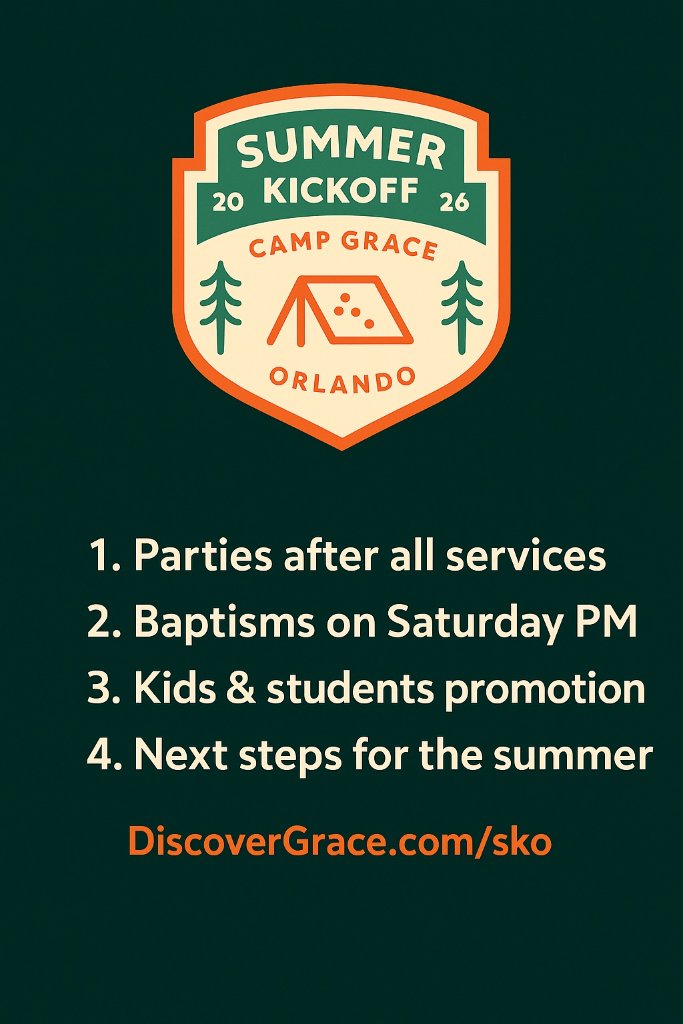
Clear, readable, and ready for phones — same content, better layout
Why church slides break on phones
The slides your media team builds for Sunday service are optimized for one thing: a large room with a wide projection screen. That means 16:9 widescreen layouts, text sized to be read from 50 feet away, and design choices that work at a room scale.
When someone opens those same slides on their phone, everything is wrong. The aspect ratio doesn't match. The text is tiny. Elements overlap or get cut off. The slide that looked polished on the big screen is nearly unreadable on a 6-inch phone screen.
Most churches have just accepted this as an unsolvable problem — until now.
How AI optimization works
- 1
Upload your original slides
Upload your sermon slides, worship slides, or announcement slides to Preachly.io. No format changes needed — use what you already have.
- 2
Create a mobile-first version
Preachly reformats the slide into one consistent 4:5 portrait layout for mobile feeds and sharing.
- 3
AI analyzes and reformats
The AI examines every element of your slide — text, logos, graphics, background — and recomposes them to fill the new format naturally and professionally.
- 4
Review and publish
Review the optimized version and publish it alongside your original slides so your congregation gets the best experience.
What gets optimized
Sermon slides
Your Sunday message presentation reformatted so your congregation can follow along and save notes from their phone.
Worship slides
Lyrics and scripture slides reformatted for easy reading during the week or for sharing with friends.
Announcement slides
Event graphics and ministry updates reformatted so attendees can read details on their phone.
Title and intro slides
Series artwork and branding reformatted for social sharing and mobile viewing.
What the AI preserves
The AI Slide Optimizer is designed to reformat, not redesign. It preserves:
- →Every word of text from the original slide — unchanged
- →Your church logo and all graphic elements
- →Your brand colors and design identity
- →The visual style and feel of the original
Frequently asked questions
What is an AI church slide optimizer?
An AI church slide optimizer is a tool that automatically reformats church presentation slides built for large projection screens into a mobile-friendly layout. It adjusts text size, layout, and composition so that slides are readable and usable on a smartphone screen.
Why do church slides look bad on phones?
Church slides are typically built in 16:9 widescreen format for projection screens. When viewed on a phone, the aspect ratio is wrong, text is too small to read, and the design doesn't adapt to a vertical or narrow screen. AI optimization reformats the slide for mobile viewing automatically.
How does the Preachly AI Slide Optimizer work?
You upload your original church slides to Preachly.io. The AI analyzes the layout, content, and composition of each slide and generates a reformatted version optimized for mobile viewing — adjusting text sizing, recomposing elements, and producing a version that reads clearly on a smartphone.
Does the AI change the content of my slides?
No. The AI Slide Optimizer preserves all text, logos, and graphics from your original slide. It reformats and recomposes the existing content for mobile — it does not rewrite, remove, or add any content.
What types of church slides can be optimized?
Preachly.io's AI Slide Optimizer works for sermon slides, worship slides, announcement slides, event graphics, and any church presentation content. Any slide built for a wide projection screen can be reformatted for mobile.